


Today’s question comes from Suzie who says, “I just got a Tablo, but I can’t find some shows I usually watch like Tracker and Will Trent. How can I find those programs in the guide so I can set them to record?”
New Tablo users who set their devices up over the summer may notice that some of their favorite television series don’t appear in the guide.
That’s because your Tablo will only display TV guide data for programs airing over the next two weeks. Series like Tracker that are slated to return in the fall, or like Will Trent in early 2027, won’t appear in your Tablo device’s guide until their premiere dates are within that 14-day window.
At that time, you’ll be able to view and schedule recordings of those programs.

And once you have a specific series scheduled to record, your Tablo will automatically record new episodes when the next season airs.
How TV Guide Data Works on Tablo

When you set up your Tablo for the first time, TV guide data is downloaded immediately for programs airing over the next 24 hours. Once the first day of data is available, your Tablo works to download an additional 13 days of programming information.
Moving forward, your Tablo will automatically download fresh TV guide data during its nightly maintenance cycle to ensure it always has details for programs airing over the next two weeks.
This is why you should wait at least an hour after initial setup of your Tablo device before attempting to create series recordings.
Still Can't Find Your Show?
If there’s a program airing in the next two weeks that you’re not able to find within your Tablo’s guide, there are a few ways to track it down:
Check a Guide Screen
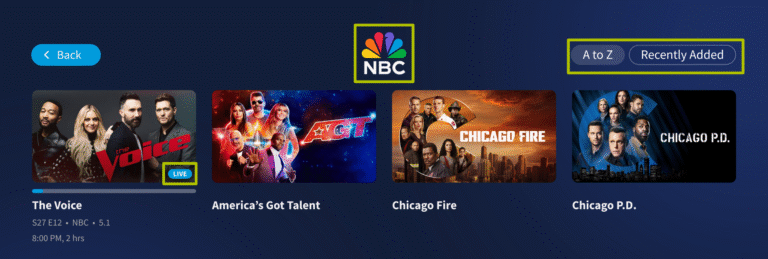
The shows, movies, news and sports screens, accessed via the side navigation menu on TV-based Tablo apps, allow you to browse live and upcoming programs by network and genre as well as suggested and featured content.
So in late September, as the season 4 premiere of Tracker approaches, you can navigate to SHOWS > NETWORKS > CBS and find the program there.

You could also navigate to SHOWS > GENRES > DRAMA and find it there.

Collection screens like NETWORKS and GENRES can be sorted by A-Z or by Recently Added programs, making it easy to find something specific or browse premiering or returning shows.
Use the Search Tool
If you have a specific show in mind or aren’t sure what network or genre your program belongs to, use Tablo’s search function.
On TV-based apps, search can be found by selecting the magnifying glass icon at the top of the side navigation menu. On mobile apps, it’s at the far right of the menu at the bottom of the screen.

As you select letters from the onscreen keyboard, Tablo will display results based on show and episode titles as well as metadata.
If you find the results list overwhelming, you can select filters such as episodes, sports, movies etc. to further refine your search.
Once you’ve found your desired program, you can select it to play or schedule a recording.