The latest Tablo news along with tips to maximize your free TV experience. 

Tablo Q&A – How Do I Find TV Shows in the Tablo Guide?

Tablo search Tracker empty

Today’s question comes from Suzie who says, “I just got a Tablo, but I can’t find some shows I usually watch like Tracker and Will Trent. How can I find those programs in the guide so I can set them to record?”

New Tablo users who set their devices up over the summer may notice that some of their favorite television series don’t appear in the guide. 

That’s because your Tablo will only display TV guide data for programs airing over the next two weeks. Series like Tracker that are slated to return in the fall, or like Will Trent in early 2027, won’t appear in your Tablo device’s guide until their premiere dates are within that 14-day window. 

At that time, you’ll be able to view and schedule recordings of those programs. 

Setting series recording on Tablo

And once you have a specific series scheduled to record, your Tablo will automatically record new episodes when the next season airs.

How TV Guide Data Works on Tablo

Tablo on shelf, with flat TV antenna in window.

When you set up your Tablo for the first time, TV guide data is downloaded immediately for programs airing over the next 24 hours. Once the first day of data is available, your Tablo works to download an additional 13 days of programming information. 

Moving forward, your Tablo will automatically download fresh TV guide data during its nightly maintenance cycle to ensure it always has details for programs airing over the next two weeks.

This is why you should wait at least an hour after initial setup of your Tablo device before attempting to create series recordings.

Still Can't Find Your Show?

If there’s a program airing in the next two weeks that you’re not able to find within your Tablo’s guide, there are a few ways to track it down:

Check a Guide Screen
The shows, movies, news and sports screens, accessed via the side navigation menu on TV-based Tablo apps, allow you to browse live and upcoming programs by network and genre as well as suggested and featured content.

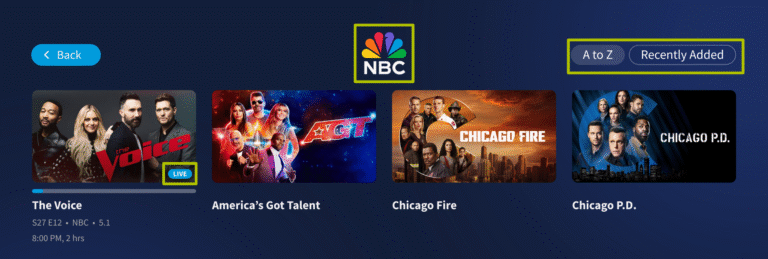
So in late September, as the season 4 premiere of Tracker approaches, you can navigate to SHOWS > NETWORKS > CBS and find the program there.

Tablo shows screen networks row

You could also navigate to SHOWS > GENRES > DRAMA and find it there. 

Tablo shows screen genres row

Collection screens like NETWORKS and GENRES can be sorted by A-Z or by Recently Added programs, making it easy to find something specific or browse premiering or returning shows.
Use the Search Tool
If you have a specific show in mind or aren’t sure what network or genre your program belongs to, use Tablo’s search function.

On TV-based apps, search can be found by selecting the magnifying glass icon at the top of the side navigation menu. On mobile apps, it’s at the far right of the menu at the bottom of the screen.

Tablo menu search

As you select letters from the onscreen keyboard, Tablo will display results based on show and episode titles as well as metadata.

If you find the results list overwhelming, you can select filters such as episodes, sports, movies etc. to further refine your search.

Once you’ve found your desired program, you can select it to play or schedule a recording.

Tablo's search screen, searching for Chicago, with several results.

Recent Blogs

Get the latest from Tablo.

Signup to get the latest product and over-the-air TV  news delivered right to your inbox. 

How to restart your phone/tablet

Sometimes, just restarting your smartphone or tablet can clear up issues with apps. The links below will provide detailed instructions on how to force close your Tablo app. 

Apple iPhone

Android smartphones 

Most Android smartphones and tablets can be restarted by holding the POWER button and then selecting RESTART or POWER OFF and RESTART from the POWER OPTIONS menu.

NOTE: Newer Samsung devices require you to hold the POWER/SIDE button and VOLUME DOWN to make the POWER OPTIONS menu appear. On the Google Pixel 6, hold the POWER and VOLUME UP buttons.

How to force close your Tablo app?

Sometimes, just restarting the app can fix things. The links below will provide detailed instructions on how to force close your Tablo app. 

Apple iPhone/iPad

Android smartphones/tablets 

Need help with the final steps?

Don’t worry, we’ve got you covered.  Follow the steps in the video below for a full walkthrough of the remaining parts of the Tablo setup process.

Tablo Logo White

Please enter a valid address. 

We recommend entering your full address for the most accurate results. 

Sorry, no results. Please check your zip code.

Getting your channels...

You can get channels for free!
Over-the-Air Channels
i
Streaming Channels
i
Tablo gives you more!
  • Pause, Record, Replay
  • Enjoy your shows whenever it’s convenient for you.
  • 50+ hours of built-in storage
  • Expandable via USB for up to 8TB of additional space.
  • Your Local Channels
  • Watch Free OTA channels – news, sports, live events, and more.
Tablo gives you more!
  • Popular Streaming Channels
  • Far more than a standard antenna can deliver.
  • Subscription-Free Entertainment
  • Get premium content without paying for costly streaming services.
  • Pause, Record, Replay
  • Enjoy your shows whenever it’s convenient for you.
  • 50+ hours of built-in storage
  • Expandable via USB for up to 8TB of additional space.

This is an estimate only. Actual broadcast TV channels received may vary based on TV antenna location, reception, topography, and other obstructions. Streaming channels require an internet connection. View the Channel Details Report for specifics of each channel and to help determine what antenna is needed. 

Reception alert:  Based upon the location you entered, you may not get many of the major networks.  As a result, Tablo may not be the best fit for you.  Please enter your full address above for best accuracy. 

Major Local Broadcast Channels

Major networks you know that have live sports, major events, local news and more. 

Entertainment and Lifestyle Channels

Sports Channels

News Channels

Movie Channels

Family and Kid Channels

En Español

Additional TV Broadcast Networks

Internet Streaming TV Channels

Internet-based free streaming channels .

AccuWeatherNow logo
Action Plus logo
All Reality
American Country Network
Anime HiDive logo
At The Movies Channel
Bachelor Nation
beIN Sports Xtra logo
Bizarre Foods with Andrew Zimmern
Buzzfeed Unsolved
Chasing Criminals
Cheddar logo
Classic Cinema
CNN Headlines
CNN Originals
court TV logo
Crime Scenes
Fubo Sports Network
Grit Xtra logo
Gusto Espanol
HBO Boxing
Historian Logo
History Untold
Home Crashers
How To
Joel Osteen Logo
Johnny Carson TV
Laff More logo
LatiNation
Mysterious Worlds
Mystery Science Theater 300
Newsmax logo
Pickle TV
Popular Science logo
Pure Flix logo
Say Yes to the Dress
Science is Amazing
Scripps Sports
Slightly Off IFC logo
Space Science Now logo
Sports Illustrated TV logo
Surf Cinema
Survive or Die
Sweet Escapes
Tasty logo
Carol Burnett Show
Dog Whisperer logo
The NASCAR Channel
Red Green Channel
Travel + Adventure
True Crime Now
Welcome Home
Wild West TV
Wired2Fish logo
World Surf League logo